
Lots at once
Tap Add, then Several Photos or Several Files, and pick up to 50. Each one becomes its own document. Kist reads them in turn and, if notifications are on, tells you when they're ready to check.
Features
No roadmap promises on this page. If it's listed here, it's in the app. Things Kist can't do yet are at the bottom.
Tap + to scan with the camera, choose photos or import a PDF. Or tap Share in Photos, Mail, Files or Safari and pick Kist.
Shiny or silver cards can come out grey in the document scanner. For those, use Take Photo instead, and take the back as well as the front.
Kist saves the pages straight away, then reads them in the background. Keep adding while it works. If you leave the app, it lets you know when documents are ready to check.
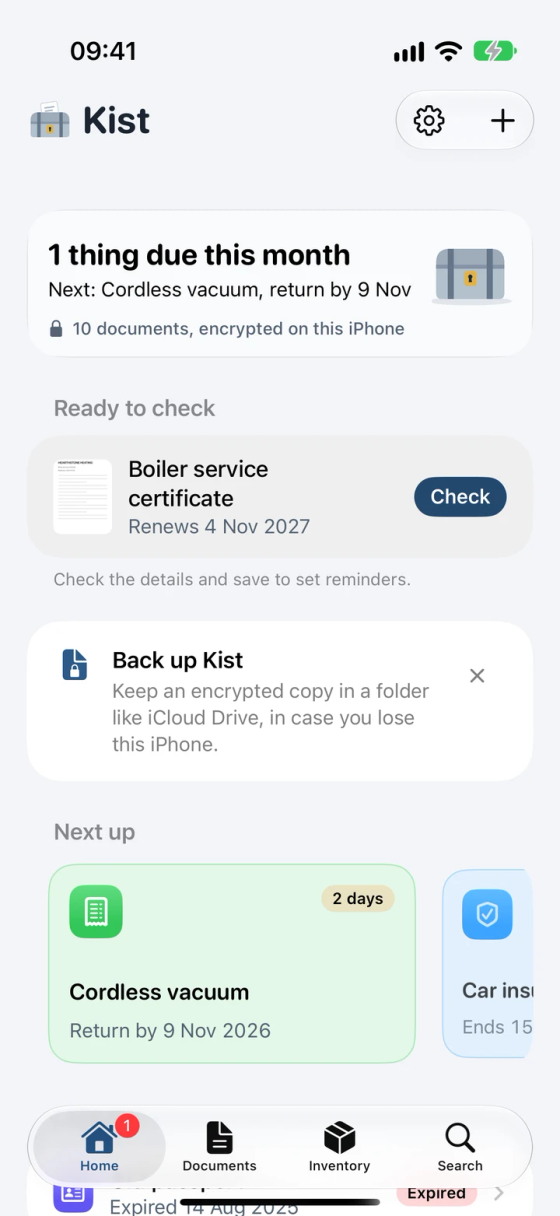
For the shoebox of receipts, and for the letter you want in Kist before you put it down.
Tap Add, then Several Photos or Several Files, and pick up to 50. Each one becomes its own document. Kist reads them in turn and, if notifications are on, tells you when they're ready to check.
Put the Add to Kist control in Control Centre or on your Lock Screen, or set it on the Action button if your iPhone has one. It opens Kist in the scanner. With Face ID lock on, Kist unlocks first.
Say it to Siri and the scanner opens. “Add a document to Kist” works too.
Kist uses the Apple Intelligence model that runs on the iPhone itself. It works out what kind of document it is, who it's from, the reference numbers and the dates that matter.
Nothing is sent to Apple's Private Cloud Compute or to any other service. No Apple Intelligence on your iPhone? Kist still reads the text and finds the dates. You fill in the rest.
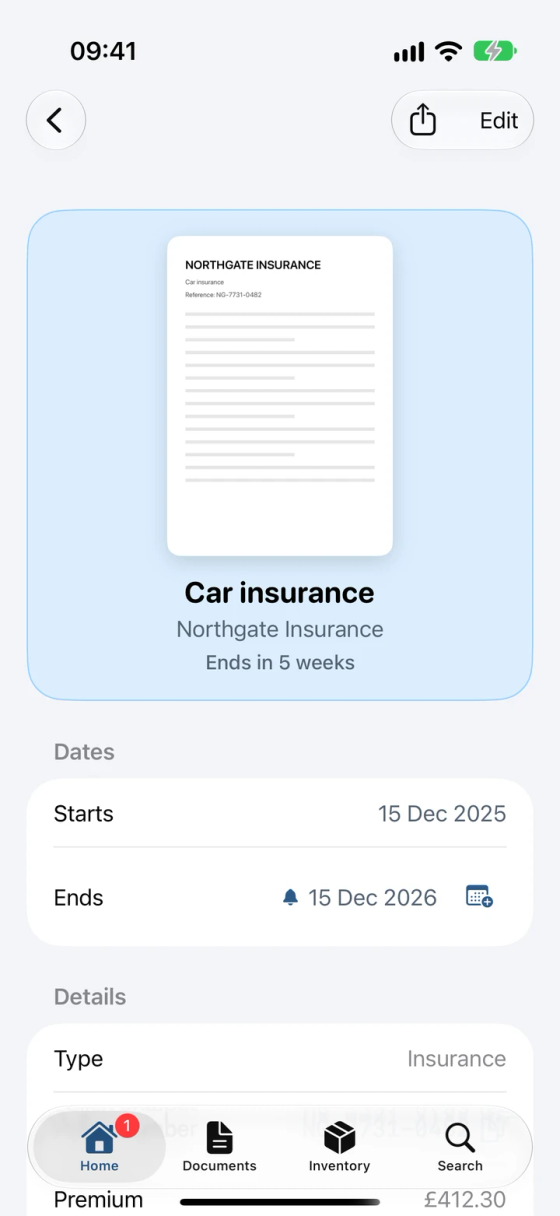
Read documents wait under Ready to check on Home. Tap any field to fix it. Return and warranty dates are worked out from the purchase date, so you don't need to count.
Want to keep something the form doesn't ask for? Add it under More details with your own label, like a sort code or a model number. Kist suggests a few it read from the page. There's a Notes field for anything else.
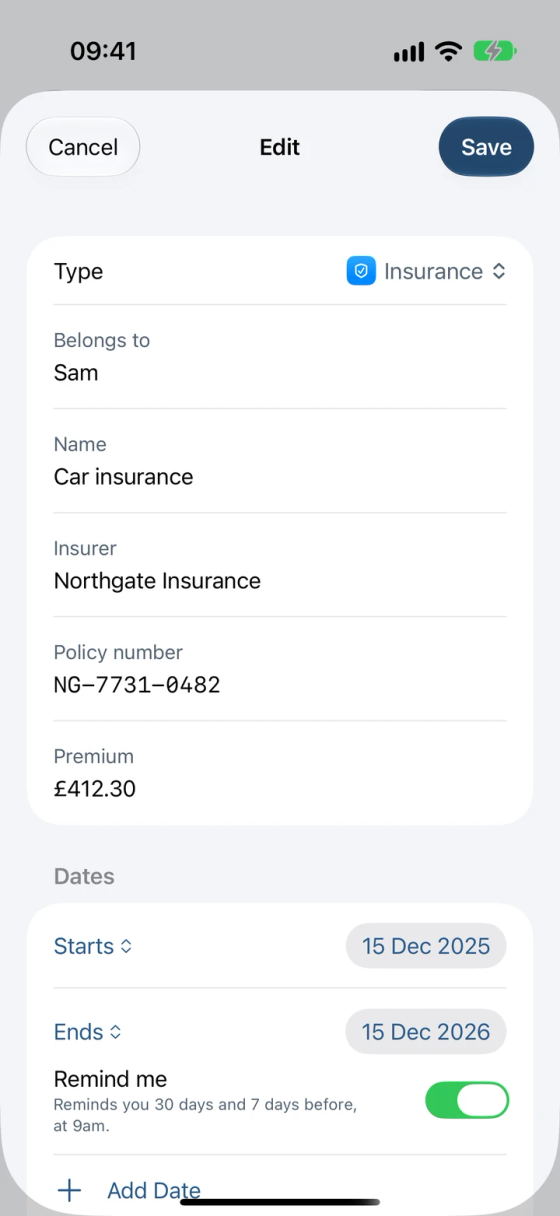
Reminders start once you save. You can switch them off for any date.
Passports, driving licences, cards, insurance, warranties, receipts, vehicle documents and contracts each have a tint, so you can find the right one at a glance.
Need something else, like Medical or Pets? Make your own type with a name, an icon and a colour. For a family, fill in who a document belongs to and Kist names it after them: Elodie's passport, Sam's driving licence.
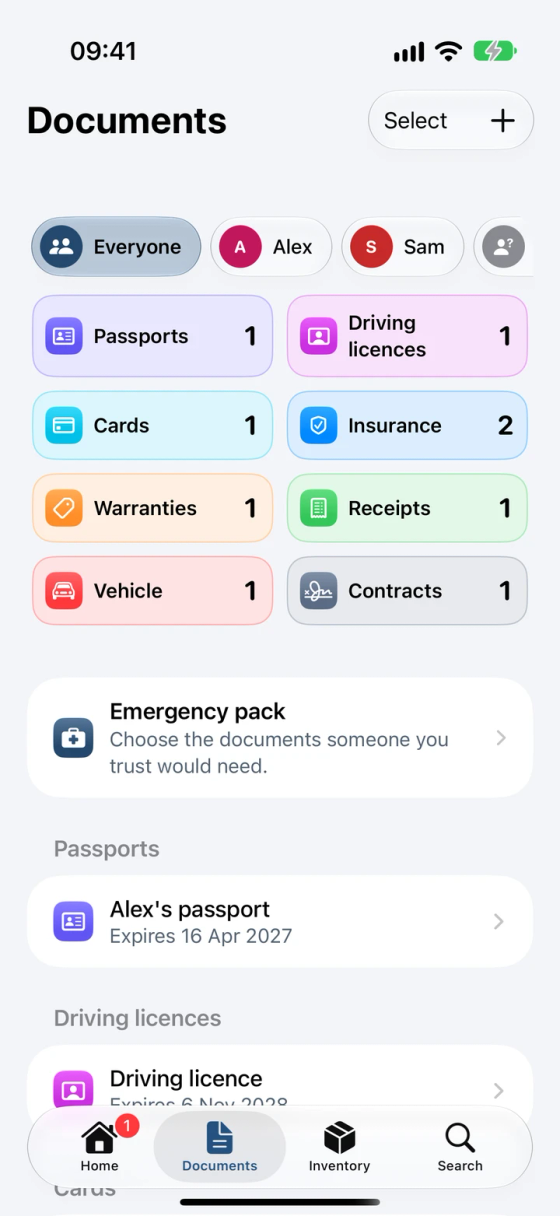
Once documents belong to two or more people, Documents shows a row of names. Tap one to see only theirs, or No one for documents that don't belong to anybody.
Anything that ran out more than 60 days ago moves to Expired at the bottom of the list, out of the way. It's still there, and still in Search.
Tap Add to Calendar next to an upcoming date and Calendar opens a new all-day event, ready for you to check and add. It never includes reference numbers or notes.
Photograph or scan a bank, credit or debit card, front and back. Kist files it under Cards and reads the bank, the card number, the expiry date and the valid from date. You check them before anything is saved.
VALID THRU 05/28 means the end of May 2028. Kist reminds you 30 days and 7 days before, so you can chase the new card and update your subscriptions.
It shows as •••• 1234 until you tap it. Copy it and it stays on this iPhone, not your other devices, and clears after two minutes.
Kist finds the card number with plain code and never passes it to the on-device AI, which only reads the rest. Like everything in Kist, it's encrypted on the iPhone.
Kist never fills in the security code or PIN. The back of most cards shows the security code, though, so a photo of the back has it in the picture. If you'd rather not keep that, skip the back or cover the code before you take it. Kist works for loyalty, membership and other cards too: save them as Other or as a type you make.
New card on the way? Our guide on what to do when your bank card is about to expire covers the switch.
All reminders arrive at 9am. Belongings with a warranty get the same 30 and 7 days' notice.
| Document | First reminder | Second reminder |
|---|---|---|
| Passport expiry | 6 months before | 2 months before |
| Insurance renewal, MOT, bank card expiry, warranty and other dates | 30 days before | 7 days before |
| Return windows and payments | 3 days before | On the day |
Home also shows how many things need you this month, and which comes first.
Why these gaps? Schengen countries want 3 months left on your passport after the day you leave (see UK passport rules for Europe). You can take an MOT up to a month (minus a day) early and keep the same date. Return windows are often short too, and if something turns out faulty, your right to reject it lasts 30 days.
Scan a renewed passport, insurance policy or bank card. If Kist spots that it replaces one you've already saved, it asks whether to replace the old one or keep both.

Replace, and the old one moves under the new one as a previous version. Reminders follow the new dates. Previous versions don't count towards the free limit.
Expiry and renewal reminders have this button. Tap it once the new one has come and Kist opens the scanner, ready to replace the old one.
Not ready to deal with it? The same reminders have this button too, and Kist asks again in a week.
The Inventory tab keeps a list of your belongings: the telly, the bike, the engagement ring. Each one has a room, photos, a price, a serial number and, if you have it, the receipt. At the top is the total you paid for the lot.
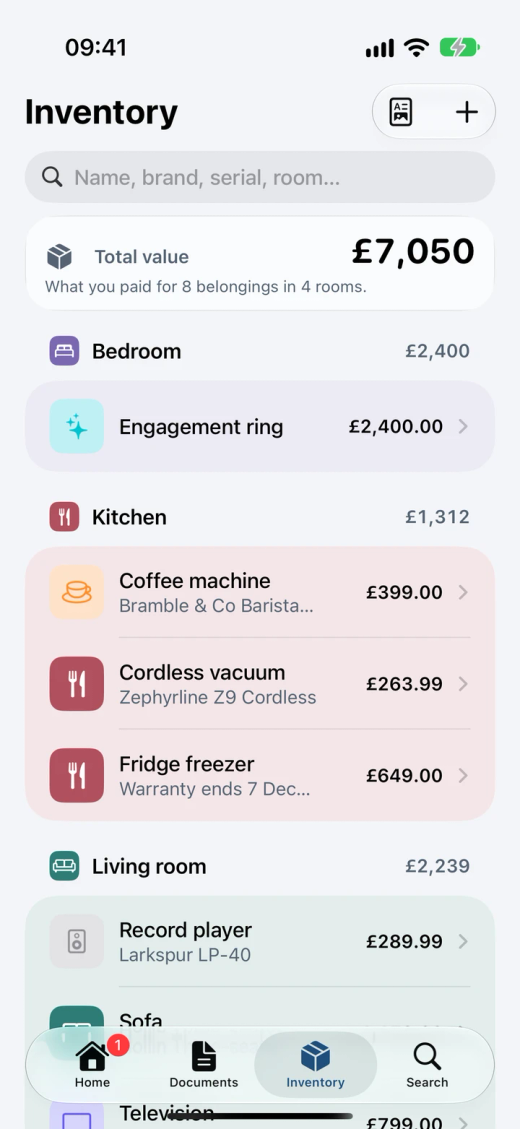
Tap Add by Voice and say something like “Brightwell telly in the living room, from Volthaven last March, about eight hundred pounds, two-year warranty.” Kist fills in the details for you to check, and keeps the voice note.
Take a photo of the thing itself, then add its label and receipt if you have them. The label gives the brand, model and serial number. The receipt gives the price, the shop and the date.
Add Manually gives you the same form, empty. Edit any belonging later in the same way.
From a photo, Kist can save the receipt in Documents, with its return and warranty dates, and link it to the belonging. You can also link a receipt you've already saved.
Add the date you bought it and how long the warranty lasts. Kist works out the end date and reminds you 30 days and 7 days before.
Export PDF makes an A4 list grouped by room, with a photo, brand and model, serial number, purchase date and price for each, and totals.
Reading happens on your iPhone, like everything else in Kist, and photos are saved without the camera's location details. Without Apple Intelligence, your spoken words go into the notes and you fill in the rest. The first time you add by voice, your iPhone may download Apple's speech model for your language.
The total is what you paid, not what it would cost to replace today, and the exported PDF isn't password-locked. For a locked copy, add your belongings to an emergency pack (below).
Going away and leaving someone in charge? Moving house? In Documents, tap Select, choose what to send, then Share as PDF. Kist makes one PDF: a summary page for each document followed by its pages, with any belongings you pick listed at the end.
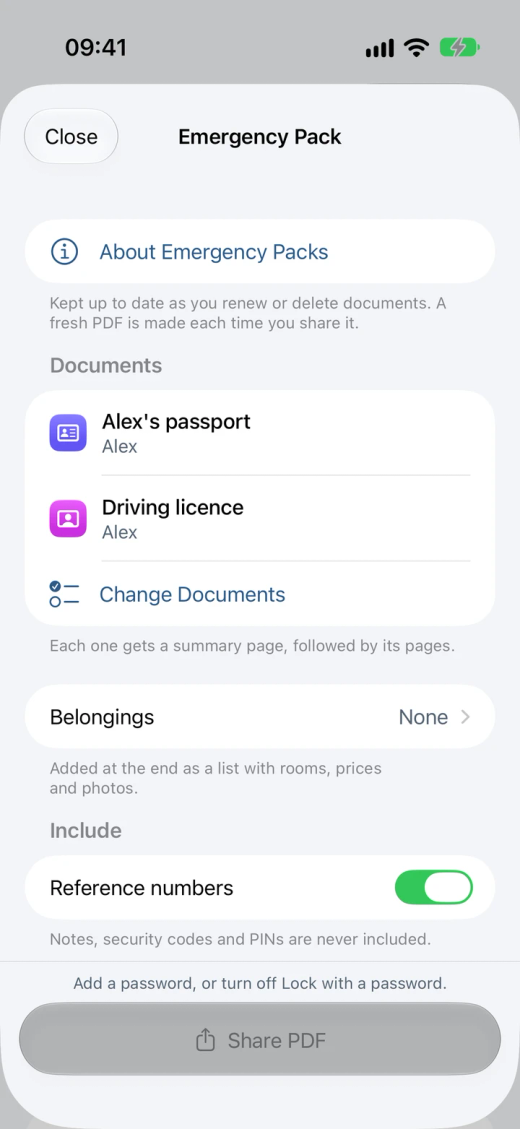
Turn on Lock with a password (8 characters or more). Kist doesn't keep the password and can't get it back, so send it a different way, like a text or a call.
Card numbers, and photos of the card, stay out unless you turn them on. Notes, security codes and PINs are never included. Reference numbers are in by default, and you can turn them off.
Save it as your emergency pack and it waits in Settings, under Emergency Pack. A renewed passport takes the old one's place. Next time, tap Share.
Once you send it, the PDF is a copy outside Kist's encryption. What that means for privacy.
Optional. Kist locks when you leave it. With the lock on, reminders say "Kist reminder" instead of the document's name.
The pages you save, and the names, dates and numbers Kist reads, are encrypted on the iPhone with a key in your iCloud Keychain. What's encrypted, exactly.
Try “What's coming up in Kist”, “When does my passport expire in Kist” or “Scan with Kist”.
See what's coming up without opening the app. With Face ID lock on, it shows counts, not names.
Scanning, reading, reminders and Siri all work with no signal. Kist only goes online for App Store purchases, a backup saved to iCloud Drive, or the first time you add by voice, when your iPhone may download Apple's speech model.
Open it and scan. There's no email address to give and no password to forget.
Save a backup of everything whenever you like, from Settings, then Backup. Put it somewhere off the iPhone, such as iCloud Drive. Saving a backup and restoring one are free, always.
Kist Pro Turn on Back Up Automatically and, once a day if anything has changed, Kist saves an encrypted backup to iCloud Drive and keeps the 5 newest.
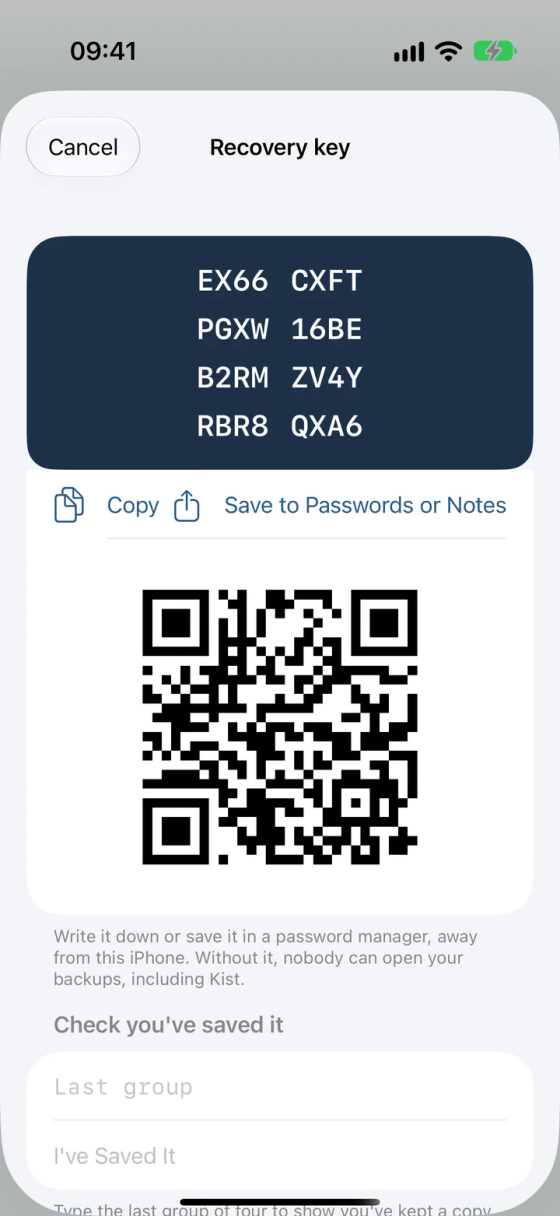
Every backup is locked with a recovery key that Kist shows you once, as 32 characters and a QR code.
Write it down or keep it in a password manager, away from the iPhone. Without it, nobody can open the backup, and that includes us.
Everything above works on the free version for your first 10 documents and belongings.See what Kist Pro adds.


